


|
Dimension |
Manual practice |
Digital practice |
|
Patient intake / admin time |
Paper forms transcribed on arrival; 15–20 min per new patient |
Forms completed online, insurance pre-verified; minutes of confirmation |
|
Records & imaging |
Physical charts, film, study models; searchable only on-site |
Cloud-based, versioned; accessible from any device |
|
Treatment planning |
Manual model setup, hours per case; varies by planner |
Digital treatment planning (e.g. VISION): AI segmentation and staging, doctor-controlled, standardized |
|
Chair time utilization |
Reactive scheduling, frequent bottlenecks |
Templated blocks, buffers, fewer no-shows |
|
Error rate & rework |
Re-keyed data, lost files, inconsistent cases |
Single source of truth, fewer hand-off errors |
|
Scalability |
Growth adds proportional admin strain |
Repeatable process scales starts without proportional headcount |
September 04, 2026
How to Improve Orthodontic Practice Efficiency with Digital Technology
Eight practical tactics to improve orthodontic practice efficiency—from morning huddles and digital intake to AI-assisted treatment planning. Learn how to reduce chair time waste and turn your clinic from reactive to productive.

SoftSmile Team
Editorial Team

Improving orthodontic practice efficiency in 2026 is no longer about working longer hours — it is about removing the friction that quietly drains your chair time, your team's energy, and your production. Competition among clinics is tighter, and patients now expect the same digital-first experience they get from every other service. This guide is written the way we build our tools, by doctors, for doctors, and gives you eight practice management tips for orthodontists that move a clinic from a reactive daily scramble toward measured, repeatable productivity, ending with the part most guides skip: digital case planning and aligner production.
Here are the eight tactics we'll cover:
-
Run focused morning huddles.
-
Build customized scheduling templates.
-
Digitize patient intake and onboarding.
-
Delegate with dedicated support roles.
-
Add virtual exams and pre-screening.
-
Go paperless with cloud-based records.
-
Adopt digital treatment planning and standardize your cases.
-
Make KPIs visible to your whole team.
Why Practice Efficiency Matters More Than Ever in 2026
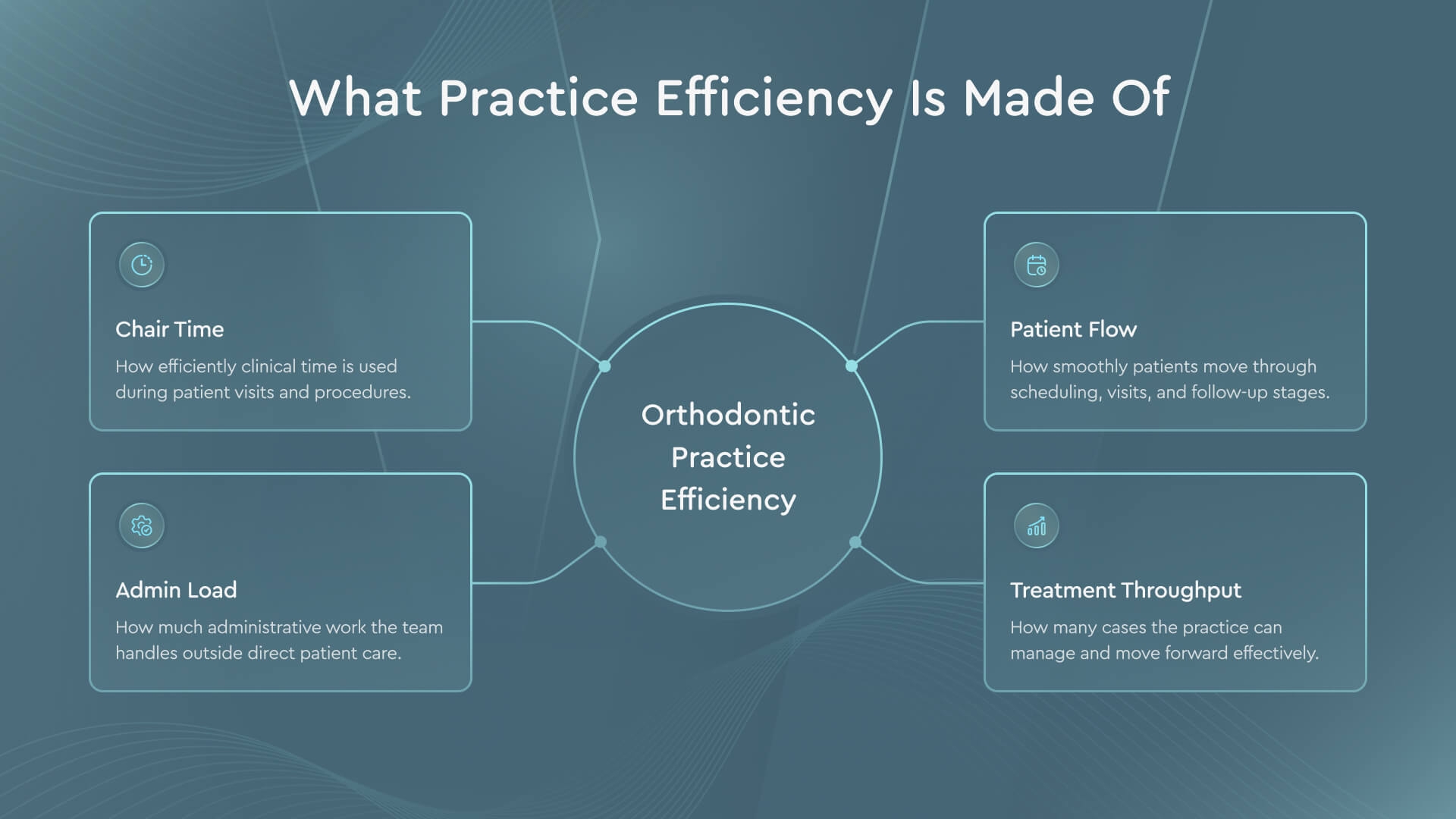
Practice efficiency is the degree to which your clinic converts its clinical and administrative effort into quality care with minimal wasted time. It is built from four moving parts: chair time (how productively each appointment slot is used), patient flow (how smoothly people move from check-in to checkout), admin load (how much manual work sits between your team and patient care), and treatment throughput (how many cases you can plan, start, and finish without quality drop-off).
The cost of ignoring these parts compounds quietly. A schedule packed without buffers produces bottlenecks and a queue that spills into the next day. Manual intake and records eat hours a treatment coordinator could spend converting consultations. And when planning is slow or inconsistent, production stalls, and you lose starts you already earned.
The demographic and market context makes this urgent. The global digital dentistry market was valued at approximately USD 6.8 billion in 2023 and is projected to grow at roughly 9.9% annually from 2025 through 2030 (Grand View Research, "Digital Dentistry Market Size, Share & Trends Report," 2024). Patients now treat digital scans, remote consultations, and transparent records as a baseline expectation, not a premium bonus.
What Is Practice Management Software and Why Orthodontists Need It
Practice management software is the digital backbone of an orthodontic office: the platform that handles scheduling, patient records, insurance verification, billing, and reporting in one connected system, replacing a patchwork of paper charts, spreadsheets, and standalone tools with a single source of truth the whole team can access.
The reason orthodontists need it comes down to running with fewer moving parts at scale. A digital workflow reduces admin time by automating the repetitive tasks: appointment reminders that cut no-shows, digital forms that arrive completed, and dashboards that surface KPIs without a manual tally. This is the core of practice management for orthodontists in 2026: fewer disconnected tools, one shared record.
Where to Start: A Roadmap for Digital Efficiency
Efficiency is not a single purchase; it is a sequence. You start where friction is loudest, the daily coordination and the schedule, then move outward to intake, roles, and records, and finish with the clinical engine that ties production together: digital case planning. That sequence is effectively a roadmap for practice management for orthodontists moving off paper, built from orthodontic office systems you add one at a time. Read the eight tactics below in order; each one makes the next easier to implement.
Tactic 1 — Run Focused Morning Huddles
A five-minute morning huddle is one of the cheapest efficiency upgrades in orthodontics because it costs nothing but attention. Before the first patient arrives, the team stands together and walks the day: which bonds and debonds are scheduled, where the tight spots are, which cases need the doctor's early sign-off, and what the daily production goal is.
The evidence behind the habit is solid. A 2021 scoping review of huddles across healthcare settings found that roughly 68% of the studies examined described huddles as a way to improve team communication, collaboration, or coordination (Pimentel et al., Journal of General Internal Medicine, 2021, doi:10.1007/s11606-021-06632-9). That kind of coordination is exactly what prevents the mid-morning pile-up where two complex appointments collide and the waiting room backs up.
Keep the format tight to protect the benefit. Assign an owner, often the office manager or lead assistant, stand rather than sit, use a shared screen with the day's schedule, and end on time. The moment a huddle stretches to twenty minutes, staff engagement drops and the ritual dies.
-
Review the day's bonds, debonds, and long appointments.
-
Flag schedule changes, gaps, and double-books.
-
Confirm which cases need doctor review before the patient sits down.
-
State the daily production goal out loud.
Tactic 2 — Build Customized Scheduling Templates
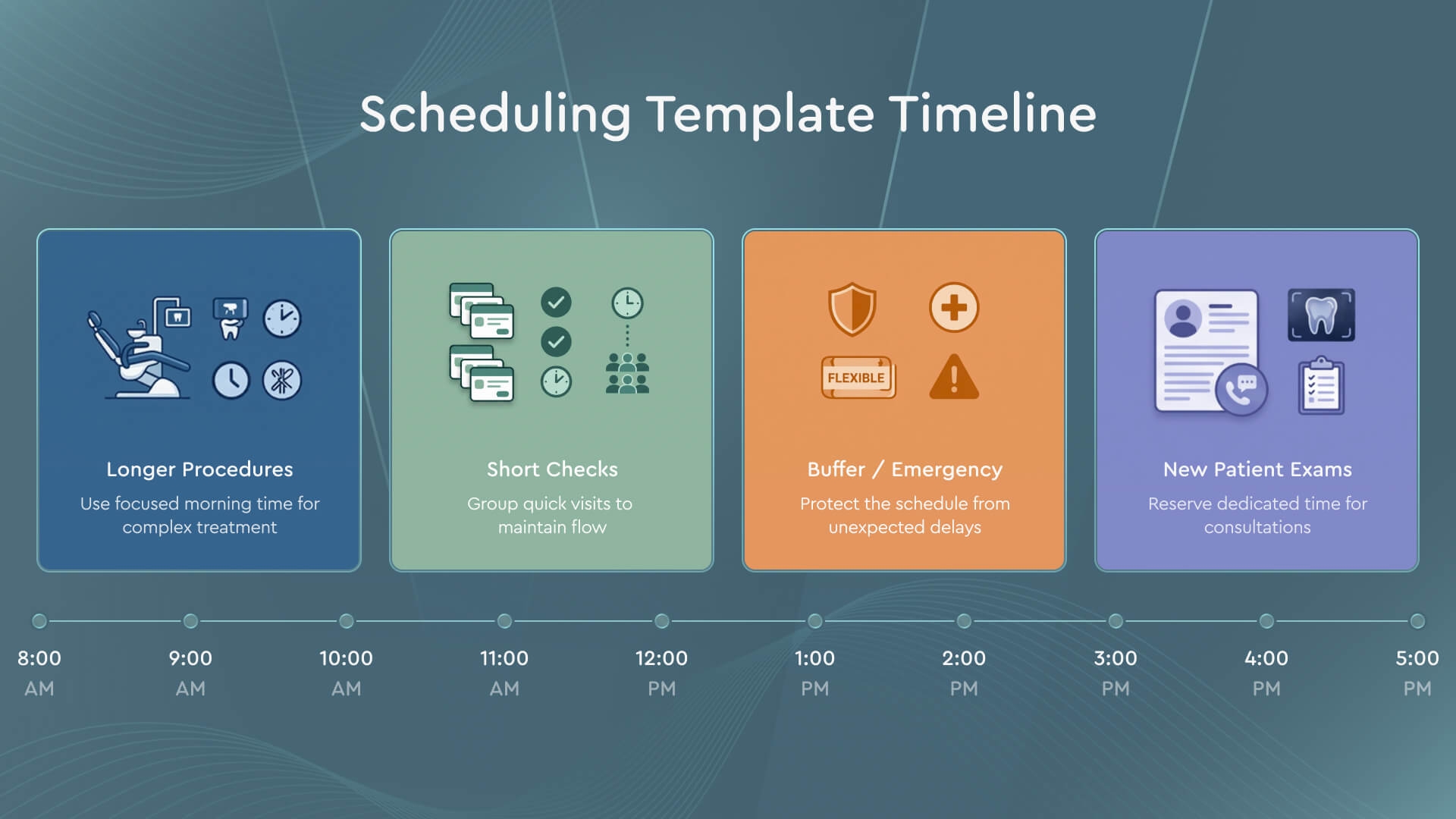
A scheduling template is a pre-built map of your day that assigns procedure types to specific time blocks, so your calendar fills itself sensibly instead of chaotically. Reserve blocks for long procedures in the morning when the team is fresh, cluster short checks in efficient runs, and hold buffer slots for emergencies, and you maximize chair time without asking anyone to work faster.
Well-designed templates directly attack bottlenecks and no-shows. Scheduling conflicts happen when a new patient exam and a difficult debond land in the same slot; a template prevents that by design. Automated reminders layered on top reduce no-shows, and reserved buffer time means one late patient doesn't cascade into a delay by lunch.
The refinement step matters. Review your template quarterly against real data: where did the day break down, which slot types ran over, which providers had idle gaps? Practices that treat scheduling as a living system, rather than a fixed grid, recover slots they didn't know they were losing.
Tactic 3 — Digitize Patient Intake and Onboarding
Patient intake is where most clinics leak time before treatment even begins. When new patients fill out digital forms at home, health histories, consent, and insurance details submitted through a HIPAA-compliant portal, the front desk stops transcribing clipboards and starts verifying data already in the system.
The savings are structural. Insurance verification can run in the background before the appointment, so the treatment coordinator walks into the consult already knowing coverage. Practice management software clears patient intake out of the appointment window entirely, one of the biggest levers on admin time you control.
Digital records also flow into case planning. Scans imported into a platform like VISION are ready for automated segmentation without manual prep, so the same digital-first discipline that speeds up onboarding also removes friction later in the clinical workflow. When intake, records, and planning share one clean data path, your team stops re-keying and starts finishing cases.

Tactic 4 — Delegate with Dedicated Support Roles
Efficiency is often a delegation problem wearing a technology costume. When a highly paid treatment coordinator spends the afternoon sterilizing instruments or filing records, the clinic pays a premium for low-value work. Creating dedicated support roles, a records technician for imaging and file management, a sterilization assistant for infection control, frees your high-value staff for the tasks only they can do: converting consultations and guiding patients.
A treatment coordinator who reclaims even two hours a day for case presentation and follow-up moves the needle on treatment acceptance far more than they would filing X-rays. Define each role in writing, with a short list of owned responsibilities and a backup for coverage. Delegation done this way is a productivity multiplier, not a payroll expense.
Tactic 5 — Add Virtual Exams and Pre-Screening
Virtual exams and pre-screening move the first patient contact out of your chair and onto a screen, where it costs almost nothing. A prospective patient submits photos and a short questionnaire; your team reviews them remotely and filters who is genuinely treatment-ready from who needs monitoring or referral.
Virtual exams free up in-office time by screening out appointments that don't need a chair, and remote consultation builds an early relationship that raises the odds a patient converts once they do come in. A secure photo-upload flow and a defined triage protocol are enough to start; you decide the clinical thresholds, the software simply routes the cases.
Tactic 6 — Go Paperless with Cloud-Based Records
Going paperless with cloud-based records is the tactic that makes every other one possible, because it turns your clinic's information into something the whole team can reach instantly and safely. Digital imaging, from intraoral scanners, digital X-rays, CBCT, and 3D models, replaces envelopes of film and study models with files that load in seconds and never get lost.
The operational gains are real. Version history means you always know which plan is current and who changed it; cloud storage means a doctor can review a case from home or between appointments. A HIPAA-conscious cloud system keeps patient data protected while letting authorized team members access exactly what they need, and because those digital files are already structured, they feed directly into case planning: no re-scanning, no manual conversion.

Tactic 7 — Adopt Digital Treatment Planning (and Standardize Cases)
Digital treatment planning is the point where efficiency stops being about the front desk and starts driving your clinical production. When case planning moves from manual model work to a digital platform, three things happen at once: cases become standardized, planning time drops, and outcomes become more predictable, because every case follows the same disciplined path from scan to staging to export. When staging, segmentation, attachments, and IPR are handled through a consistent digital process rather than reinvented case by case, quality stops depending on which team member happened to plan it. One way to standardize cases is with digital treatment planning built around AI assistance: in VISION, automated segmentation and staging cut planning time, with the doctor keeping full clinical control over every movement.
According to SoftSmile, practices using VISION see treatment planning time reduced by up to 95% through automated segmentation and staging, moving from hours of manual setup to a plan ready for review far faster. That figure is SoftSmile's own reported benchmark, not an independent industry study. Cleared through FDA 510(k) (K212770), the platform runs in the browser with no installation, integrates CBCT for complex cases, and exports STL files ready for in-house printing or a partner lab.
The business consequence is the one owners care about. Once digital treatment planning standardizes case outcomes, adding clear aligners to your service menu becomes operationally realistic, and clear aligner services grow practice revenue by opening a treatment category to patients who would otherwise go elsewhere. AI in orthodontics, used this way, means faster doctor-controlled setup, not a black box making decisions on its own.

Tactic 8 — Make KPIs Visible to Your Whole Team
You cannot improve what your team cannot see. Making KPIs visible, on a shared dashboard, in the morning huddle, on a screen in the staff area, turns abstract goals into daily reality. The metrics that matter most for an orthodontic office are patient starts, treatment acceptance rate, production, and average wait times.
Visibility drives accountability without pressure. A treatment coordinator who watches the acceptance rate climb takes ownership of it, and a front desk that sees wait times in real time self-corrects before a bottleneck forms. Benchmarking against your own past months, rather than a vague "we should do better," gives the team a concrete target.
Keep the dashboard focused. Five clear metrics reviewed consistently beat twenty metrics no one reads. Tie each number to an owner and revisit them in the huddle, so measurement becomes a habit rather than a quarterly report nobody acts on.

How These Tactics Compound: Manual vs Digital Practice
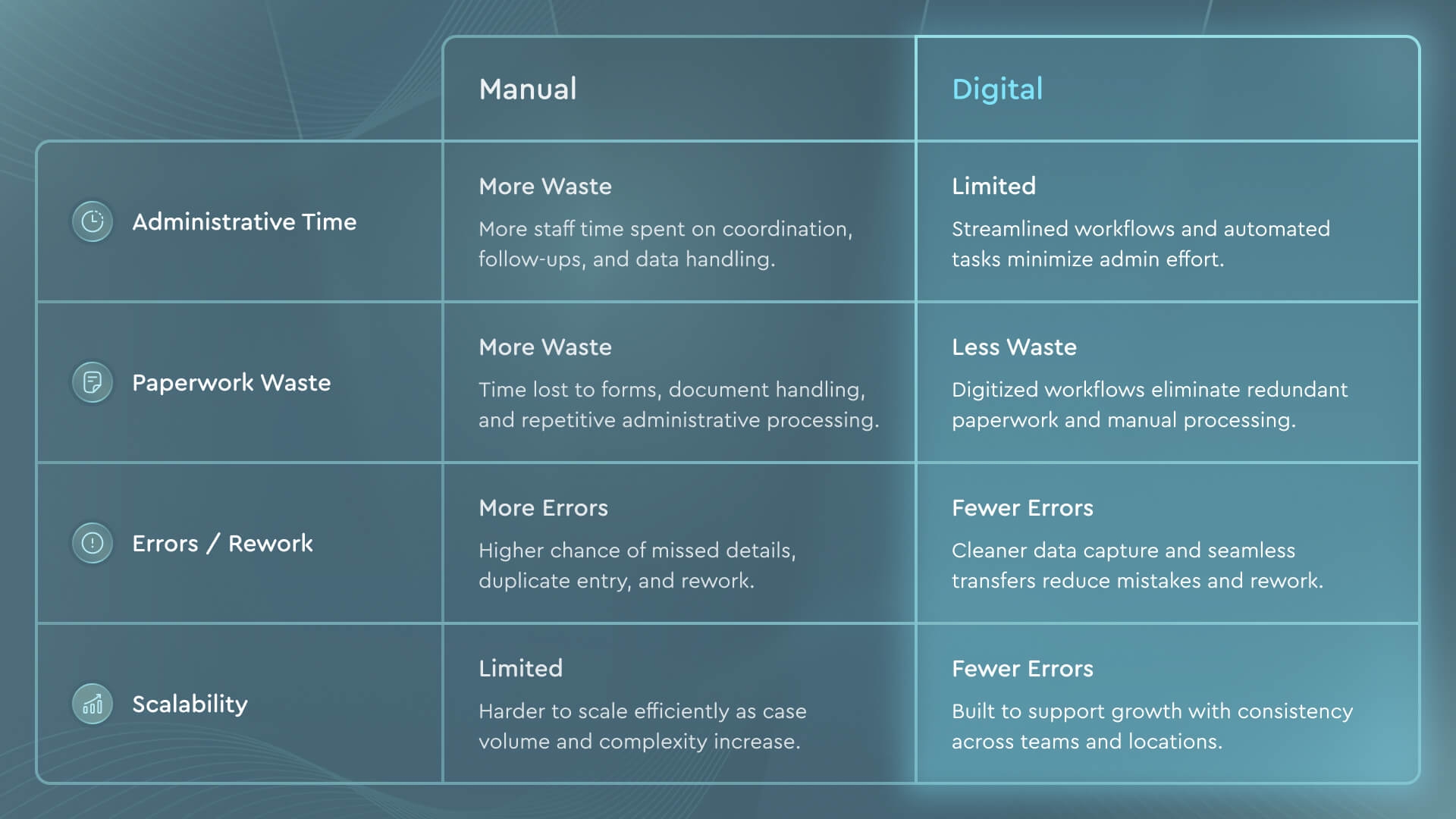
None of these tactics works in isolation; they compound. A digital intake feeds clean records; clean records feed fast planning; fast planning frees chair time; freed chair time raises production, which shows up on the KPI dashboard the team reviews each morning. The table below contrasts a manual clinic with a fully digital one across the dimensions that decide orthodontic office efficiency.
Read across any row and the pattern is the same: the digital path removes a manual step, and the removed step is where time and errors used to hide.
About SoftSmile — Digital Planning Without Monthly Fees
We built VISION as a digital treatment planning platform for orthodontists who want speed without giving up clinical judgment. It runs in the browser, no installation, and uses AI to automate segmentation, staging, and setup while leaving every clinical decision with the doctor. It integrates CBCT for complex cases and exports STL files, so you choose how to produce: your own lab, a partner lab, or printing through SoftSmile. There are no mandatory monthly platform fees on the per-case path; you pay for the cases you actually export, so a slow month doesn't cost you a subscription you didn't use. High-volume practices can take Dr. Vision's flat subscription with unlimited exports instead, and the VISION Portal, your case-management and collaboration space, comes at no extra cost with a SoftSmile product. VISION carries FDA 510(k) clearance, and today more than 50 orthodontic labs use the platform in production. It assists the doctor; it does not replace clinical decision-making.
If you want to see AI-assisted case planning with the doctor in control, book a VISION demo and walk through a live case with our team.
Conclusion
Real orthodontic practice efficiency in 2026 comes from stacking small, deliberate changes until they reinforce each other: focused huddles, smart scheduling templates, digital intake, clear support roles, virtual pre-screening, paperless cloud records, digital case planning, and visible KPIs. None of them is dramatic on its own. Together, these practice management tips for orthodontists turn a clinic that reacts to its day into one that runs its day.
The through-line is the shift from manual guesswork to a repeatable digital workflow, and the clinical engine of that shift is standardized, doctor-controlled treatment planning. Start where the friction is loudest, add one tactic at a time, and let the compounding do the rest.
FAQ
What is practice management software and why do orthodontists need it?
Practice management software is the platform that unifies scheduling, patient records, insurance verification, billing, and reporting in one system. It's the backbone of practice management for orthodontists: it replaces scattered paper charts and spreadsheets with a single source of truth and connects to clinical tools like scanners and case planning, which reduces errors and frees the team for patient care.
What is the best practice management software for orthodontic offices?
There is no single system that fits every clinic; the right choice depends on your size, whether you need on-premise or cloud access, your budget, and which clinical tools you already use. Evaluate options by how well they automate intake and reminders, how cleanly they integrate with your imaging and treatment planning, and whether reporting surfaces the KPIs you track. Trial the shortlist before committing.
How can I cut wait times without hiring more staff?
Work on the schedule and the intake first. Customized scheduling templates with buffer slots prevent the bottlenecks that create waits, digital intake moves paperwork out of the appointment window, and virtual pre-screening keeps chairs reserved for treatment-ready patients. None of this requires new headcount, just better systems.
How much does digital treatment planning cost?
Pricing models vary. Some platforms charge monthly subscriptions regardless of use; others, like VISION, offer a per-case model with no mandatory monthly platform fee, plus flat-subscription options for high-volume clinics. When comparing, look past the sticker figure to hidden monthly commitments and whether case management is included.
Where should I start when digitizing my clinic?
Start where friction is loudest, usually daily coordination and scheduling, then move to digital intake, defined support roles, and paperless cloud records, and finish with digital treatment planning, which ties production together. Adopt one tactic at a time and make KPIs visible from the start so you can measure whether each step is actually improving orthodontic office efficiency.
Do digital tools really increase practice revenue?
Yes, indirectly and directly. Freed chair time and higher treatment acceptance raise production, while standardized digital treatment planning makes it operationally realistic to add clear aligner services, a whole treatment category that grows revenue.


Sign up for our newsletter!
Case Studies, Podcasts, Ebooks, Events, Webinars, Company news, and more...
By subscribing you agree to the Terms of Use and Privacy Policy.


