


|
Component |
What to prepare |
|
Patient information and priorities |
Case ID, date, participants, chief concern, and questions |
|
Diagnostic summary |
Relevant findings and supporting records |
|
Treatment goals |
Intended changes, priorities, and limitations |
|
Options and recommendation |
Alternatives, trade-offs, and the treating doctor's recommendation |
|
Visual explanation |
Selected photographs, models, and any simulation |
|
Timeline and responsibilities |
Estimated duration, appointments, patient participation, and retention |
|
Financial summary |
Included services, additional charges, and payment terms |
|
Questions and next steps |
Open questions, written summary, and agreed follow-up |
Tech and Innovations
October 26, 2026
Orthodontic Case Presentation: A Practical Framework for Your Team
A practical guide to orthodontic case presentation for orthodontists, practice owners, and treatment coordinators. It covers a seven-step workflow, a case presentation template, a readiness checklist, and criteria for choosing digital tools. The focus is on consistent, patient-centered consultations that document decisions and keep the clinical plan, patient explanation, and consent aligned.

SoftSmile Team
Editorial Team

An orthodontic case presentation is the point at which the diagnosis and proposed treatment plan become the information a patient needs to make an informed decision. For orthodontists, practice owners, and treatment coordinators, the challenge is to explain the clinical rationale, the expected changes, and the practical commitments in a way that stays consistent from one team member to the next. This article sets out a seven-step workflow, together with a template, a readiness checklist, and criteria for choosing the digital tools that support it.
What Is an Orthodontic Case Presentation and Why It Matters
A case presentation translates the diagnostic workup into a discussion of why treatment is recommended, which options are clinically appropriate, and what each of them would require. The initial consultation usually identifies the patient's concerns and the need for further records, and the treatment discussion then draws on those findings to explain a specific recommendation, giving the patient enough context to weigh the proposed treatment against its alternatives and commitments.
The ADA's guidance on case presentations recommends delivering the presentation as a natural conversation rather than a sales pitch, supported by plain language and visual aids, with the patient involved in the decision and the risks of both accepting and declining the recommended care discussed openly.
The link between presentation quality and case acceptance

What looks like a financial objection often reflects uncertainty about the clinical recommendation as much as the cost. A patient who asks about the fee may still be unclear about why further treatment is necessary, what the intended changes would achieve, or how treatment would fit into daily life, and answering only the price question leaves those doubts in place.
Case acceptance is one measure of the consultation process, not the only one. Unanswered questions, requests for more time, and the reasons patients give for declining all help identify gaps in explanation or follow-up, and an informed decision not to proceed should be respected and documented like any other outcome.
The 7-Step Workflow: How to Read This Guide

The first three steps establish the clinical plan and the materials that support it, the next three organize the discussion with the patient, and the final step documents the decision. Each task should be assigned to a named team member, with the treating doctor responsible for the clinical recommendation and for the consent discussion.
Step 1 — Collect Complete Diagnostic Records
Start with the chief concern, the relevant medical and dental history, and a clinical examination, then review the photographs, models or intraoral scans, and radiographs needed to assess the case. The records should genuinely support the recommendation, since completing an upload checklist does not on its own establish that they are adequate.
Imaging selection remains an individual clinical decision. The ADA's radiography guidance recommends ordering radiographs based on clinical need and incorporating CBCT only when lower-exposure options will not provide the necessary diagnostic information, so CBCT should not appear as a routine prerequisite in every patient's consultation checklist.
Before planning, check that:
· Records are correctly identified and dated.
· Scans or models, including any imported STL files, capture the anatomy and bite relationship needed for the case.
· Photographs and clinically indicated radiographs are interpretable.
· Relevant previous records have been reviewed when available.
· Missing information has been obtained, or the resulting limitations have been addressed.
Keep the original records available throughout, so that the proposed setup can be checked against the diagnostic findings at every stage.
Step 2 — Build and Review the Treatment Plan
Translate the diagnosis into a problem list and treatment objectives before preparing the patient-facing explanation. From there, identify the clinically appropriate options and any case-specific limitations, taking account of treatment stages, the patient's responsibilities, and retention.
For an aligner case, the proposed setup and staging sequence should be reviewed against the clinical findings, including how the planned movements, attachments, interproximal reduction, and auxiliaries support the treatment objectives. Any revisions should be made before the consultation, so that a preliminary setup is never mistaken for the prescribed plan.
Software can take on much of the preparatory work. SoftSmile VISION, for example, combines automated tooth segmentation and AI-assisted setup with tools for adjusting tooth movements, elastics, and attachments, but whichever orthodontic case presentation software the practice uses, the treating doctor remains responsible for reviewing and approving the plan before it is presented.
Finally, summarize the diagnosis, objectives, recommendation, alternatives, and uncertainties, and make sure that the coordinator's materials and the patient-facing summary are based on the same plan version.
Step 3 — Prepare Your Visual Materials and Template
Visuals are most useful when they are chosen for the clinical question they help explain: a photograph can highlight a clinical finding, while a model can show occlusal relationships or planned tooth movements. Arranged in sequence, these views connect the initial condition with the purpose of the proposed changes.
An orthodontic case presentation template gives the team a repeatable order for these materials while leaving room for the patient's priorities and the complexity of the case. It should also include space for the patient's questions and a written summary they can review afterward.
What a good case presentation template includes
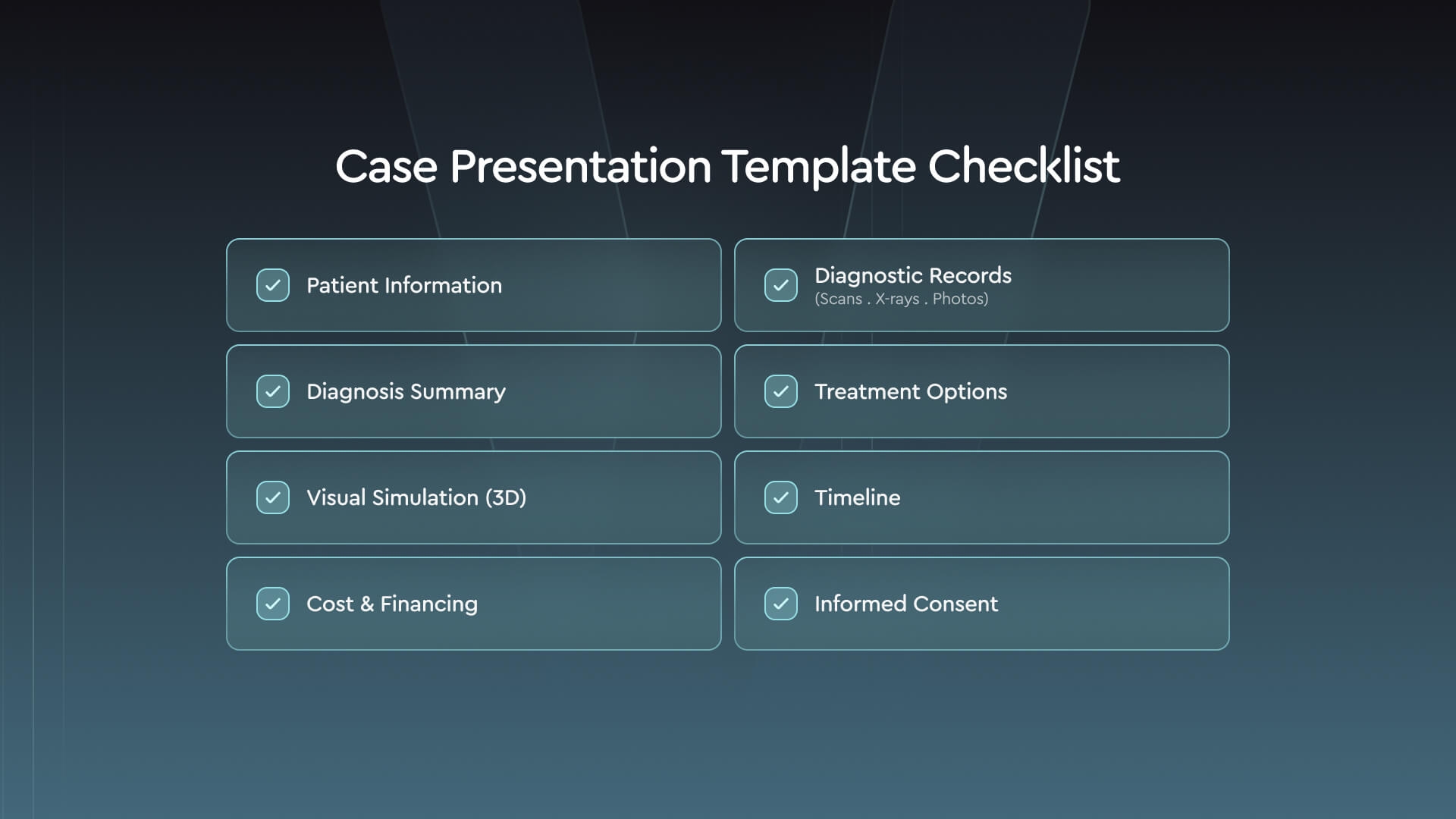
The same template can serve as a slide deck, a consultation summary, or a preparation form, with the level of detail adjusted to each. Whatever the format, the patient-facing explanation should reflect the same plan as the clinical record without reproducing the full diagnostic workup.
VISION's WebViewer supports the review of treatment simulations through the Portal, which allows the team to prepare the views needed for the discussion. It is worth checking access before the appointment and being ready to explain how the displayed sequence relates to the proposed plan, and why actual treatment progress may require adjustments along the way.
Step 4 — Structure the Conversation with the Patient
Begin by revisiting the patient's priorities and asking whether their concerns have changed since the initial visit. From there, connect the clinical findings to the treatment goals, explaining technical terms in plain language so that the patient can follow the recommendation and ask specific questions about it.
A useful sequence for an orthodontic case presentation moves from the patient's concern to the clinical finding, the proposed goal, the options, and the next steps, with a pause between topics to invite questions. Asking the patient to describe the recommendation in their own words is a simple way to reveal which part of the explanation needs more attention.
Questions to support the patient discussion
The examples below can help structure that conversation, and they work best when adapted to the patient and the proposed treatment.
· Clarify priorities: "What would you most like treatment to change?"
· Check understanding: "To make sure I've explained this clearly, could you describe what we're trying to address and how the proposed treatment would help?"
· Discuss options: "What questions do you have about how these treatment options compare?"
· Explore concerns: "What concerns you most about the proposed treatment?"
· Support the decision: "What else would you like to discuss before deciding whether to proceed?"
Roles should be agreed in advance. The coordinator can organize materials and administrative follow-up, while the treating doctor answers questions about clinical suitability, risks, and expected outcomes, and any clinical questions should be addressed before the patient is asked to decide.
Step 5 — Present Treatment Options and Expected Outcomes

Present the clinically appropriate options, explaining how each supports the treatment objectives and what it requires from the patient. Where a patient has asked for an option that is unsuitable, the clinical findings are usually the clearest way to explain why.
For each option, explain the intended changes and key trade-offs, the estimated treatment duration, the patient's responsibilities, and retention, and discuss possible adjustments and timeline uncertainties before the patient commits.
Any digital comparison should be labeled as initial and projected tooth positions, with a clear explanation that the simulation represents planned movements rather than a guaranteed clinical endpoint, and a proposed digital setup should always be distinguished from records of a completed clinical result.
Dr. Luca Galli shares an example of how photographs and a digital setup can be used together to connect a clinical finding with the proposed treatment goals:
“A teenager who had previously completed treatment with braces still had a deep bite and a gummy smile. Her mother’s first reaction was, ‘We already did orthodontics.’ I used photographs to show how the lower incisors were contacting the gingival tissue behind the upper teeth.
“I then placed the VISION setup alongside her daughter’s photographs to explain the proposed upper incisor intrusion with TADs and our goals of opening the bite and reducing gingival display. Seeing the clinical finding and the proposed tooth movements together helped her understand why we were recommending further treatment—for function as well as appearance.”

In this example, the photographs and setup connect a clinical finding with a functional goal, while the mechanics belong to this individual plan. The broader lesson is to choose views that clarify your own recommendation and to leave time to discuss its limits and the patient's questions.
Step 6 — Discuss Cost and Financing Clearly
Written financial information should be reviewed alongside the recommendation, so that the patient can relate the fee to the scope of the proposed treatment. It should specify the services included and any circumstances that may generate additional charges, and the payment schedule and available financing arrangements should be explained before any financial commitment is made.
Where insurance is involved, distinguish confirmed benefits from estimates and explain when the patient can expect an update if coverage is still being verified. Any unresolved costs should be identified, since estimated benefits do not guarantee a reduction in the patient's out-of-pocket costs.
Before offering another payment arrangement, it helps to establish whether the concern relates to the total fee, the payment timing, insurance coverage, or the purpose of treatment itself, and questions about clinical necessity should be returned to the treating doctor.
In line with the ADA guidance, financing is usually best discussed by the appropriate staff member, such as a financial coordinator, and the patient should be given time to consider the information, with follow-up arranged for any unresolved questions.
Step 7 — Secure Informed Consent and Document Everything
Informed consent is a discussion of the proposed treatment, its risks and benefits, the appropriate alternatives, and the implications of declining treatment, as outlined in the ADA's consent guidance. The treating doctor must have that conversation with the patient personally, and neither a completed form nor a discussion with staff can replace it.
The patient should have the opportunity to ask questions before deciding, and when a minor is involved, the team should confirm who has authority to consent. Documentation should be appropriate to the proposed procedure and to the applicable state rules.
The record should identify the recommendation, any significant questions, and the decision, including informed refusal where applicable, together with unresolved questions and the agreed follow-up, so that another team member can continue the discussion consistently.
As a final check, confirm that the clinical plan, written summary, financial arrangements, and consent documentation all describe the same treatment, and resolve any discrepancies with the patient and the treating doctor before the decision is documented.
Orthodontic Case Presentation Requirements: A Practical Checklist
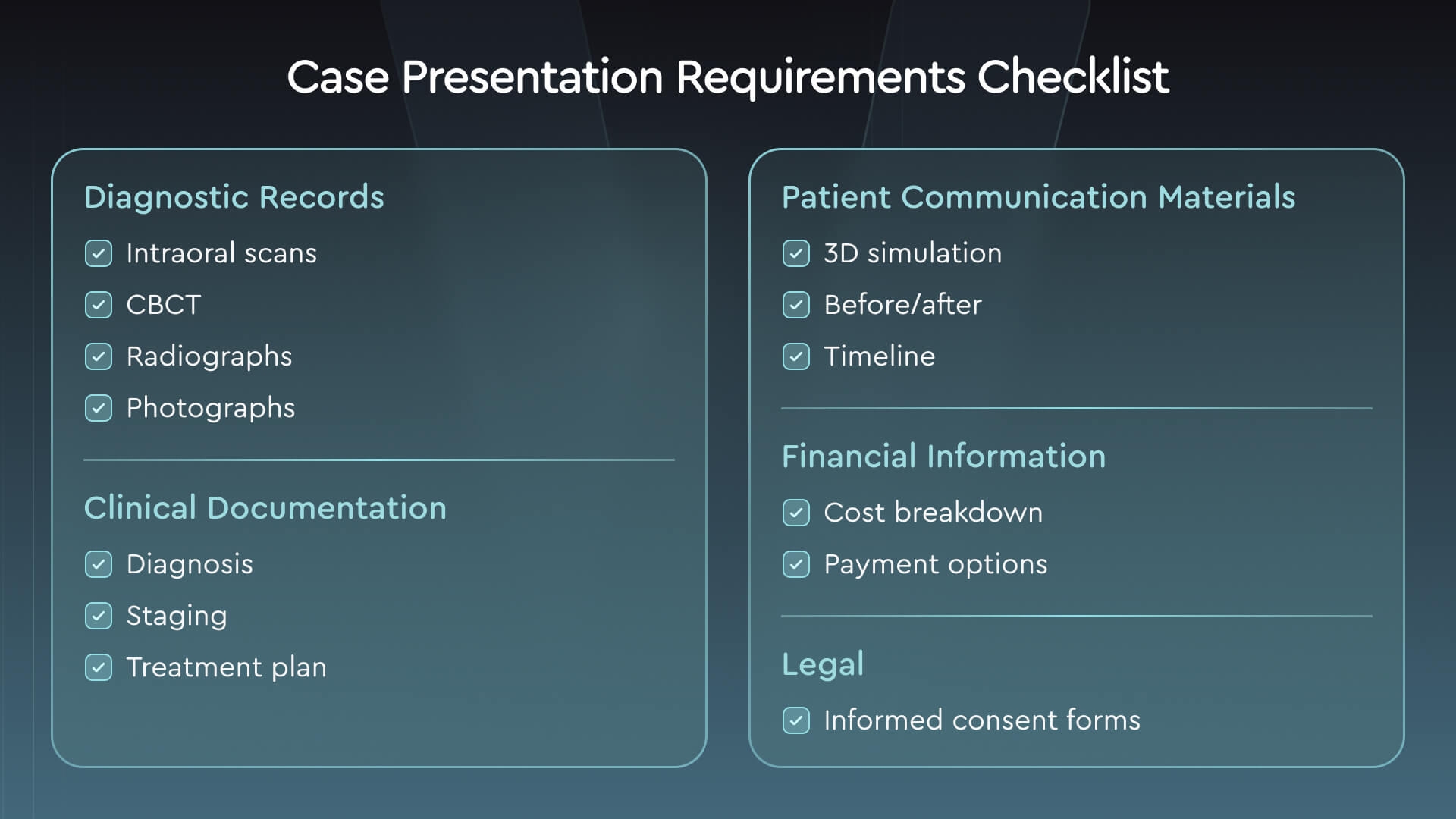
Use these orthodontic case presentation requirements to check readiness before and after the consultation, adapting them to the case and the jurisdiction. The checklist is a practical aid rather than a universal legal standard or imaging protocol.
|
Area |
Readiness check |
Applicability |
|
Diagnostic records |
History, examination findings, and usable records are available |
Every case; record types vary |
|
Imaging |
Clinically indicated images have been reviewed |
According to diagnostic need |
|
Clinical plan |
The treating doctor has reviewed goals, options, risks, and limitations |
Every proposed plan |
|
Visual materials |
Images and simulations match the version being discussed |
When visuals are used |
|
Patient understanding |
Questions have been invited and unclear points addressed |
Every discussion |
|
Financial information |
Fees, included services, and payment arrangements are explained |
Before a financial commitment |
|
Consent and authority |
The treating doctor's consent discussion and appropriate authorization are documented |
Depends on the treatment and jurisdiction |
|
Decision and follow-up |
The decision, unresolved questions, and next action are recorded |
After the consultation |
For a reusable preparation form, download the case presentation worksheet, which combines a presentation template with a readiness checklist: the template helps organize your materials, while the checklist tracks completed items and outstanding tasks.
Each preparation task should be assigned to a named team member, with clinical content reviewed by the treating doctor before the appointment and documentation checked afterward. Used this way, the checklist supports completeness while leaving the conversation free to respond to the patient.
Digital Tools That Streamline Case Presentation
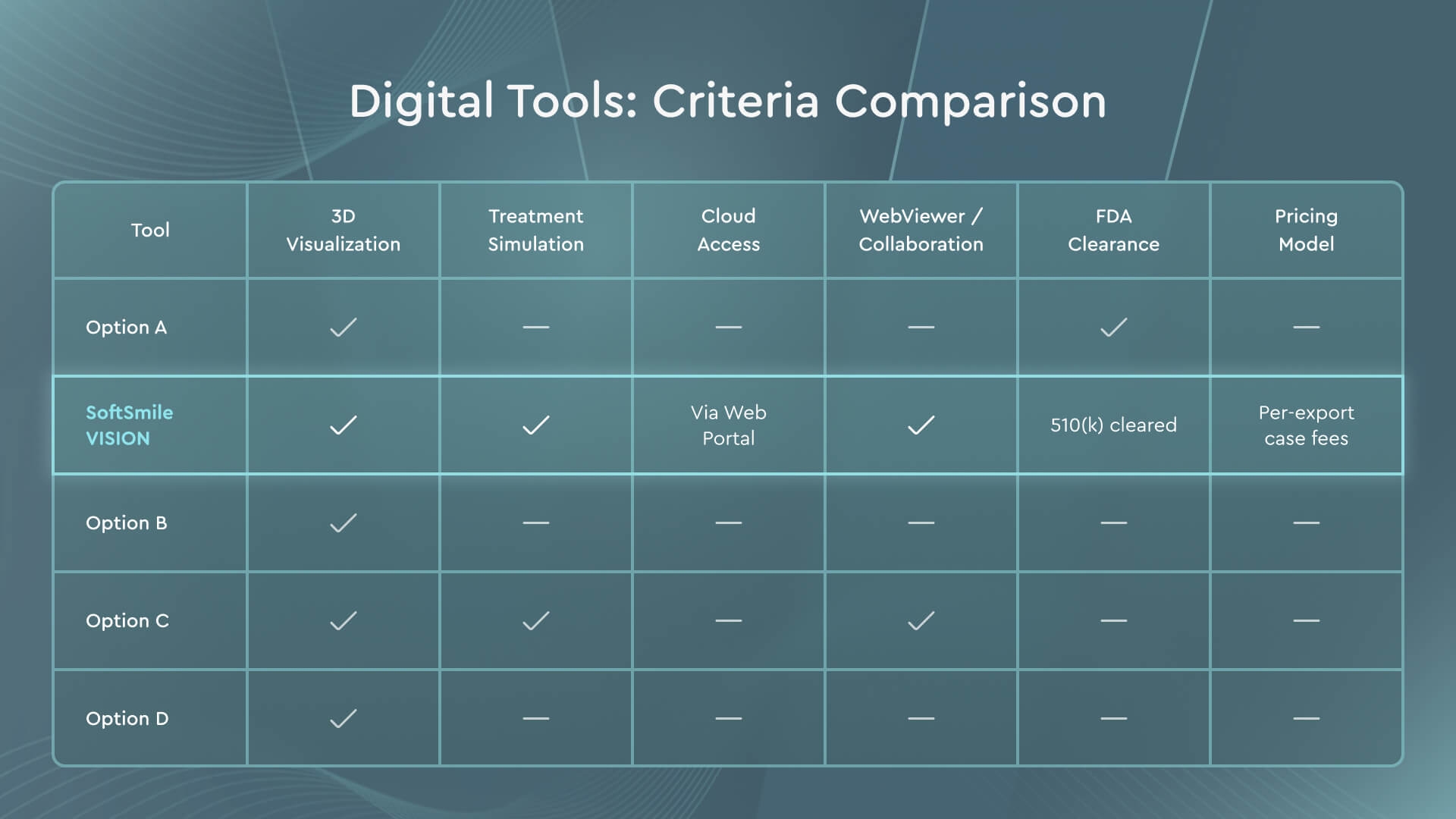
Orthodontic case presentation software is best evaluated by how well it supports the team's consultation process, including how easily the team can locate the current plan, show the relevant views, and explain their limits. It also helps to distinguish the functions used to build the plan from those used to review or present it.
|
Criterion |
What to check |
|
3D visualization |
Can you show relevant views without distracting controls? |
|
Simulation |
Are initial, staged, and projected positions clearly distinguishable? |
|
Clinical control |
Can the treating doctor inspect and revise the proposed plan? |
|
Compatibility |
Can you use the records and file formats your workflow requires? |
|
Review and collaboration |
Can users access the correct version and exchange comments? |
|
Data handling |
Are permissions, sharing, and retention arrangements clear? |
|
Regulatory status |
Does the documented intended use fit the application? |
VISION, for example, combines segmentation and staging tools with Portal and WebViewer functions for case review and discussion, and a demonstration is a good opportunity to check how access and responsibilities are divided between planning, patient review, and administrative case management.
Wherever possible, test the workflow with a case you are authorized to use, following the full sequence from opening the records to locating the current plan, showing the selected views, and reviewing comments. Regulatory claims should be checked against the device's documented intended use, bearing in mind that clearance does not by itself show that a tool increases case acceptance.
About SoftSmile — How VISION Supports Consistent Case Presentation
At SoftSmile, we develop tools that connect orthodontic planning with case review and discussion. VISION combines automated segmentation and setup with staging tools, while the Portal and WebViewer support case organization and simulation review.
VISION holds FDA 510(k) clearance (K212770), while diagnosis, treatment recommendations, and plan approval remain the responsibility of the treating doctor.
See how 3D simulation can support your next treatment discussion. Request a demo focused on presenting the clinical goal, the planned movements, and the treatment sequence.
Conclusion
A consistent orthodontic case presentation connects adequate diagnostic records and a reviewed plan with a clear explanation of the clinical rationale, the appropriate options, and the practical commitments involved. Visuals help clarify that explanation, while inviting questions and documenting the decision and next steps keep the whole team working from the same understanding.
The template and checklist give that process a consistent structure. A good place to start is to identify one point that regularly leaves patients uncertain and to agree, as a team, on how it will be addressed.
FAQ
What should an orthodontic case presentation include?
It should include the clinical findings, treatment goals, options, estimated duration, patient responsibilities, retention, costs, and next steps, supported by selected records. If the patient chooses to proceed, consent should be documented following the treating doctor's discussion.
How can I use an orthodontic case presentation template?
The table in Step 3 can be used to organize your consultation materials, adapted to the diagnosis and the patient's priorities and accompanied by a concise written summary. Detailed clinical records should be kept separate from the patient-facing explanation.
What are the orthodontic case presentation requirements?
You need diagnostic information that supports the recommendation, a plan reviewed by the treating doctor, clear explanations, financial details, and documentation. The records required depend on clinical need, and consent requirements depend on the proposed treatment and the jurisdiction.
How does orthodontic case presentation software help?
It can make planned tooth movements available for visual review and support sharing a plan with authorized participants, but its value depends on the workflow and on the explanation that accompanies it. A simulation alone does not confirm understanding or guarantee acceptance.
How long should the discussion take?
Allow enough time to explain the recommendation, compare the appropriate options, and answer questions, bearing in mind that complexity and patient needs will determine the appointment length. If important questions remain, it is better to arrange a follow-up than to rush a decision.


Sign up for our newsletter!
Case Studies, Podcasts, Ebooks, Events, Webinars, Company news, and more...
By subscribing you agree to the Terms of Use and Privacy Policy.


